HDD SSD Laptop Caddy 9.5mm TT-CP-221 – 2nd Drive, Hot Swap, Dual Channel
Across India
Payment
Accepted
About this item
Product Description
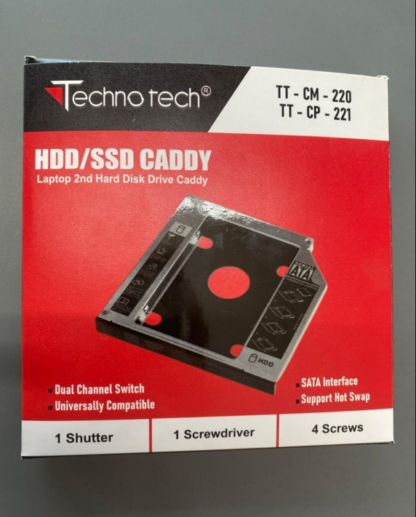
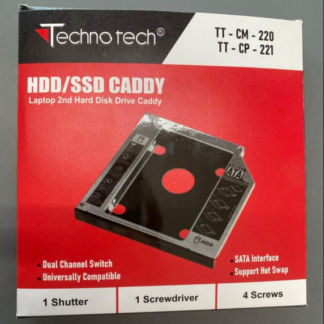
HDD SSD Laptop Caddy – 2nd Hard Drive Adapter 9.5mm (TT-CP-221), Dual Channel Switch, Hot Swap, Universal SATA Interface, Supports Up to 3TB
Upgrade your laptop storage and enhance its performance with the HDD SSD Laptop Caddy (TT-CP-221). Designed to replace your optical drive, this caddy allows you to install a second HDD or SSD seamlessly. Perfect for storage expansion, data backup, and faster laptop operation, this versatile adapter provides dual-channel switching, hot swap support, and a universal SATA interface for compatibility with most laptops.
Expand Your Laptop Storage up to 3TB
With support for hard drives and SSDs up to 3TB, the HDD SSD Laptop Caddy offers ample space for documents, multimedia files, games, and software. Its 9.5mm height ensures compatibility with most laptop optical drive bays, allowing you to easily add a second drive without making modifications to your system.
-
Learn more about 2.5” SATA drives (DoFollow) to understand compatibility and performance.
Universal SATA Interface for Maximum Compatibility
The TT-CP-221 laptop caddy features a universal SATA interface that works with all standard 2.5” SATA HDDs and SSDs. With plug-and-play installation, your laptop recognizes the second drive immediately, making it a convenient solution for professionals, students, and casual users alike.
-
Check out our Laptop Storage Upgrade Guide (internal link) for tips on maximizing your laptop’s storage capacity.
Hot Swap and Dual Channel Switch Features
One of the standout features of this caddy is its hot swap support, which allows you to remove or replace drives without shutting down your laptop. This is ideal for users who frequently work with multiple drives or require temporary storage solutions.
The dual-channel switch enables seamless toggling between the optical drive and the drive installed in the caddy. This allows you to retain your optical drive functionality while benefiting from additional storage.
Complete Installation Kit Included
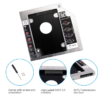
This laptop caddy comes with all the tools and accessories required for a secure and easy installation:
-
1 shutter to cover the optical bay
-
1 screwdriver for installation
-
4 screws to mount the drive firmly
No additional tools or drivers are needed, making the installation process quick and hassle-free.
Wide Operating System Compatibility
The TT-CP-221 HDD SSD Laptop Caddy works with a variety of operating systems, including:
-
Windows 2003
-
Windows Vista
-
Windows 7
-
Windows 8.1
-
Windows 10
-
Windows 11
This broad compatibility ensures that it works with both older and modern laptops, making it a versatile solution for any user.
Ideal For Multiple Use Cases
The 9.5mm HDD SSD Laptop Caddy is perfect for:
-
Expanding laptop storage for files, videos, and software
-
Replacing the optical drive with an additional HDD or SSD
-
Backup and recovery solutions
-
Portable data access without relying on external drives
-
Office, gaming, and multimedia laptops
Specifications
| Feature | Details |
|---|---|
| Product Name | HDD SSD Laptop Caddy – 2nd Hard Drive Adapter 9.5mm (TT-CP-221) |
| Drive Type | 2.5” SATA HDD/SSD |
| Maximum Capacity | 3TB |
| Drive Height | 9.5mm |
| Interface | SATA |
| Hot Swap Support | Yes |
| Switch Type | Dual Channel |
| Included Accessories | 1 Shutter, 1 Screwdriver, 4 Screws |
| OS Compatibility | Windows 2003 / Vista / 7 / 8.1 / 10 / 11 |
| Installation | Optical Drive Replacement / Plug & Play |
| Usage | Laptop Storage Expansion / SSD Upgrade |
Why Choose This HDD SSD Laptop Caddy?
-
Add a second hard drive or SSD to your laptop
-
Supports up to 3TB storage for all your files
-
Hot swap support for quick drive changes
-
Dual channel switch for seamless optical drive integration
-
Compact 9.5mm size fits most laptops
-
Comes with a complete installation kit
-
Compatible with a wide range of Windows OS
The HDD SSD Laptop Caddy 9.5mm (TT-CP-221) is a durable, reliable, and versatile solution for anyone looking to upgrade laptop storage, add SSD acceleration, or set up a dual-drive system.
Customer Reviews
Only logged in customers who have purchased this product may leave a review.
Reviews
There are no reviews yet.