Technotech KVM Switch 2 Port (PS/2) – Ultimate Dual PC Controller
Across India
Returns
Payment
Accepted
About this item
Product Description
Technotech KVM Switch 2 Port PS2 – Ultimate Productivity Dual PC Controller
Overview
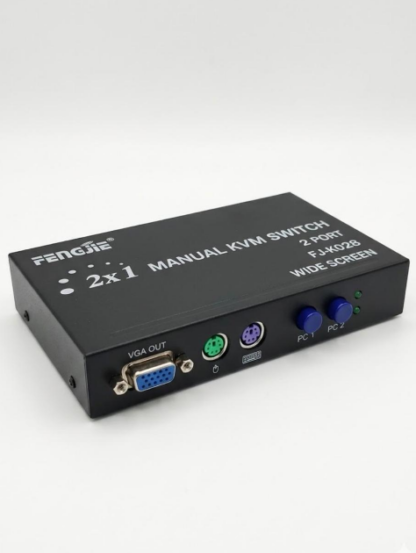
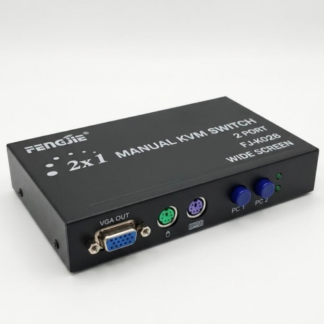
The Technotech KVM Switch 2 Port PS2 is a premium device designed to allow users to control two computers using a single keyboard and mouse. This innovative switch is ideal for IT professionals, home offices, gaming setups, and server administrators, providing an efficient way to manage multiple PCs without clutter.
With the KVM Switch 2 Port PS2, you can instantly switch between two computers using a simple hotkey command or front button, saving time and increasing workflow efficiency. Its compact and durable design ensures it fits perfectly on any desk or server rack, while providing reliable, long-term performance.
Compatible with PS/2 keyboards and mice, this switch works seamlessly with Windows, Linux, and other PS/2-supported systems. It’s perfect for professionals who need stable and fast control over multiple systems at the same time.
Key Features of KVM Switch 2 Port PS2
-
Dual PC Control: Manage two computers from a single keyboard and mouse setup.
-
Easy Switching: Switch effortlessly with a hotkey command or front-button control.
-
Compact & Durable Design: Space-saving and built to last, ideal for both office and home environments.
-
Plug-and-Play: No additional software or drivers required, just connect and use.
-
LED Indicators: Quick visual confirmation of the active computer.
-
Wide Compatibility: Supports PS/2 keyboards/mice and Windows/Linux operating systems.
-
Cost-Effective Solution: Eliminates the need for multiple keyboards and mice, saving money and desk space.
-
Reliable Performance: Ensures smooth keyboard and mouse input with minimal latency.
How KVM Switch 2 Port PS2 Works
-
Connect both computers to the KVM switch using the included PS/2 cables.
-
Plug your keyboard and mouse into the console ports on the KVM switch.
-
Use the front button or hotkey commands to switch between computers.
-
LED indicators display which computer is currently active.
Note: This device mirrors keyboard and mouse input only and does not extend or duplicate display output.
Benefits of Using KVM Switch 2 Port PS2
-
Desk Space Optimization: Use a single keyboard and mouse to manage two PCs, reducing clutter.
-
Increased Productivity: Switch seamlessly between computers without unplugging devices.
-
Professional Use: Perfect for IT professionals managing multiple systems in server rooms or offices.
-
Home Office Convenience: Simplifies multi-PC setups for users working from home.
-
Durable and Long-Lasting: High-quality materials ensure long-term stable performance.
-
Cost Savings: Reduces the need for additional peripherals, making it a budget-friendly solution.
-
Portability: Compact design allows easy placement or transport.
Specifications of KVM Switch 2 Port PS2
-
Ports: 2 PS/2 computers
-
Console Ports: PS/2 keyboard and mouse
-
Switching Method: Front button or hotkey
-
LED Indicators: Yes, shows the active computer
-
Cable Length: 1.2–1.5 meters
-
Dimensions: Compact, lightweight, and portable
-
OS Compatibility: Windows, Linux, and PS/2-supported devices
Who Can Benefit from KVM Switch 2 Port PS2
-
IT Professionals: Efficiently manage multiple computers from a single console.
-
Gamers: Control two gaming PCs without additional peripherals.
-
Home Office Users: Simplify multitasking across multiple computers.
-
Server Room Managers: Quickly access multiple systems without clutter.
-
Educators & Trainers: Easily switch between teaching systems during workshops or classrooms.
-
Small Businesses: Save on hardware costs and workspace space by using one console for multiple PCs.
Tips for Best Performance
-
Use high-quality PS/2 keyboards and mice to ensure optimal response.
-
Keep all cables securely connected to avoid signal loss.
-
Utilize hotkey commands to switch quickly without pressing the physical button.
-
Avoid exceeding recommended cable lengths.
-
Place the switch in a ventilated area to maintain durability.
-
Regularly check connections for seamless operation.
Explore more KVM Switches & Splitters: USB KVM Switches & Splitters
Customer Reviews
Only logged in customers who have purchased this product may leave a review.
Reviews
There are no reviews yet.